
Have you ever received a shiny new Amazon Gift Card Redeem and wondered what to do next? You are definitely not alone. Many people get these handy cards for their birthday or a holiday, but they feel a bit confused about how to use them. Redeeming your gift card is actually very fast and simple. In fact, once you do it the first time, it takes less than a minute to add those funds straight to your digital wallet.
Over the years, I have helped many family members add their gift cards to their Amazon accounts. I always tell them that the secret is to save the code to your account balance right away. This stops you from losing the physical card or forgetting the claim code. Let’s dive into the simple steps to get your account loaded up and ready for your next online shopping trip.
Find Your Amazon Gift Card Claim Code
Before you can add any money to your account, you need to locate your claim code. If you have a physical gift card, gently scratch off the protective silver coating on the back. Underneath, you will see a mix of letters and numbers. This is your special code.
If you received a digital gift card through email, simply open the message. You will see a claim code right there on the screen. It is usually a 14-character code that contains both numbers and letters. Make sure you do not confuse the order number with the actual claim code.
Log In to Your Amazon Account
The next step is to open the Amazon website on your computer or open the Amazon mobile app on your phone. Make sure you log in using your correct email address and password. If you do not have an account yet, it only takes a couple of minutes to create one for free.
Being logged in ensures that the gift card funds go directly to your personal balance. Double-check that you are on the correct regional website, such as Amazon.com, so your currency matches the card correctly.
Go to the Gift Cards Section
Once you are logged in, look at the top menu bar on your screen. Click or tap on “Accounts & Lists” near your name. A large menu will drop down on your screen.
From this menu, find and select the option that says “Your Payments” or “Gift Cards“. If you are using the mobile phone app, tap the menu icon at the bottom of your screen, choose “Your Account”, and scroll down to the gift card section.
Click Redeem a Gift Card
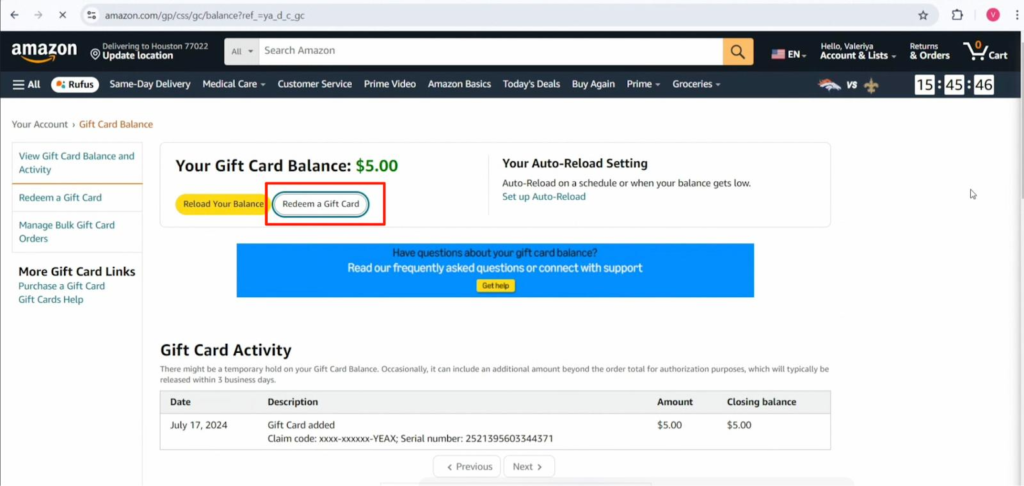
Now that you are on the main gift card page, you will see a few different buttons. Look for the button that clearly says “Redeem a Gift Card”. Go ahead and click or tap on that button.
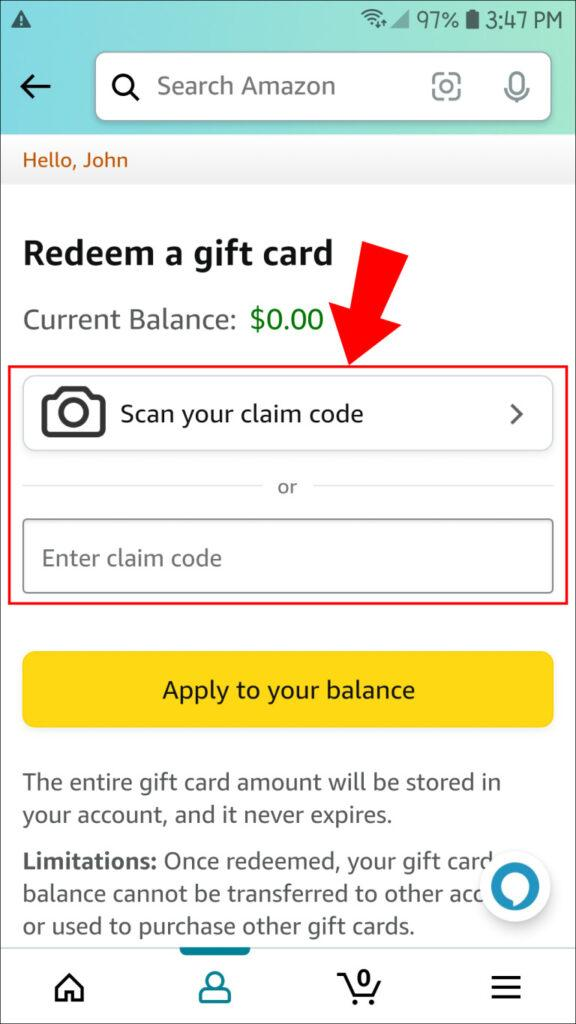
This will open a new page with a special box where you can type in your code. This page will also show you your current gift card balance if you have any money already saved in your account.
Enter Your Claim Code Carefully
Type your 14-character claim code into the empty box on the screen. You must type it exactly as it appears on your card or in your email. However, you do not need to type the dashes (-) because Amazon will add those in for you automatically.
Take your time during this step to avoid any mistakes. Typing a wrong letter or number will cause an error message to pop up. Double-check your typing before moving to the final step.
Apply the Balance to Your Account
After typing the code, click the yellow button that says “Apply to Your Balance”. The system will instantly check the code. If the code is correct, you will see a success message on your screen.
You will also see your new total gift card balance update right away. The great thing about this process is that the money stays in your account until you spend it. You do not have to use it all on one single order.
Check Your Account Balance
It is always a good idea to verify that the money is safely in your digital wallet. You can do this by going back to the “Gift Cards” page in your account menu.
Your active balance will be clearly displayed on the screen. Knowing your exact balance helps you plan your shopping cart so you know exactly how much you can spend without using your credit card.
Start Shopping on Amazon
Now comes the fun part! You can browse the massive online store and add items to your shopping cart. You can buy books, electronics, clothes, household items, and much more using your gift card funds.
When you are completely finished shopping, proceed to the online checkout page. Amazon will automatically give you the option to use your gift card balance to pay for your order.
Select Your Gift Card at Checkout
On the final checkout screen, look at the payment methods section. Make sure the box next to your gift card balance is checked.
If your order total is less than your gift card balance, the remaining funds will stay in your account for next time. If your order costs more than your gift card balance, you can simply pay the remaining difference using a debit card or credit card.
Place Your Order
The very last thing to do is click the yellow “Place your order” button. You have successfully used your gift card to buy something you wanted without spending extra cash out of your pocket.
You will receive a confirmation email from Amazon shortly after. Now you just need to wait for your package to arrive at your front door.
Frequently Asked Questions
Can I use an Amazon gift card without an account?
No, you must create a free Amazon account and log in to redeem and spend your gift card claim code.
Do Amazon gift cards expire?
No, funds added to your Amazon account balance do not expire. You can take your time using them.
Can I transfer my gift card balance to someone else?
Once you redeem the claim code to your account balance, you cannot transfer those funds to another person’s account.
What can I buy with an Amazon gift card?
You can buy millions of eligible physical goods and digital items sold on Amazon, though you cannot use them to buy other gift cards.
Can I add an Amazon gift card directly at checkout?
Yes, you can enter the claim code directly on the final checkout screen in the payment method area.
What should I do if my gift card code does not work?
First, double-check that you typed the letters and numbers correctly. If it still fails, contact Amazon customer support for help.
Conclusion
Redeeming an Amazon gift card is a quick and safe way to add spending money to your account. By following these easy steps, you can start shopping for your favorite items right away.
Did this guide help you add your gift card successfully? Feel free to leave a comment below and let me know what you plan to buy with your balance!